
Have you ever used a plugin and found something that could clearly be better? That feeling is what pushed me to start making WordPress open source contributions to MC4WP. It is one of the most installed MailChimp plugins for WordPress, with over 900,000 active installs. That means any code I write ends up running on nearly a million sites. In this article, I will walk through all 8 of my merged pull requests, what each one does, and why this kind of work matters to me personally.
Why I Chose MC4WP
MC4WP, short for Mailchimp for WordPress, is developed and maintained by ibericode. It connects WordPress sites to Mailchimp, letting site owners build signup forms and integrate with popular form plugins like WPForms, Gravity Forms, Ninja Forms, and more.
Two things drew me to it. First, the codebase is clean and well-structured. The maintainer, Danny van Kooten, has clear patterns for how integrations are built, and he takes pull requests seriously. Second, the open issues list had real, specific problems. These were not vague feature wishes. They were things users were actually hitting.
I was also building my own plugin that extends MC4WP, so I had already spent time reading through its internals. That gave me a head start before I submitted my first PR.
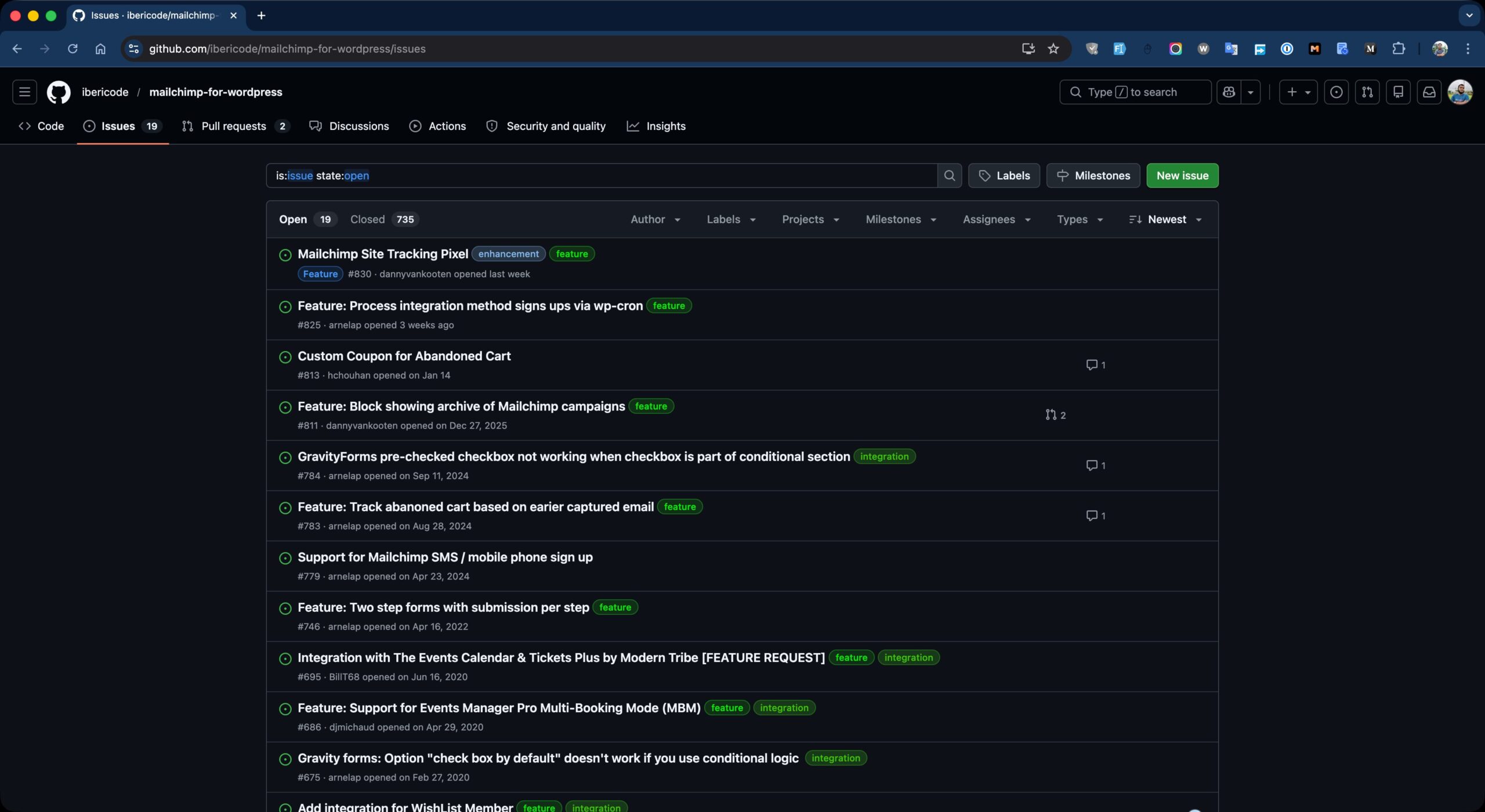
My WordPress Open Source Contributions to MC4WP
Here is a full breakdown of all 8 merged pull requests.
Autocomplete Attributes on Form Fields (PR #816)
The default MC4WP signup form had no autocomplete attributes on its fields. Browsers and password managers use these to identify what a field expects and to offer autofill suggestions. Without them, autofill either did not work or filled the wrong data into the wrong fields.
I added the correct autocomplete values to the three core fields: email for the email field, given-name for first name, and family-name for last name. This required changes in three JavaScript files handling the form editor’s field definitions and generator, plus the default PHP form content. The fix makes signup smoother for users and removes unpredictable browser autofill behavior.
Gravity Forms Live Label Update Fix (PR #818)
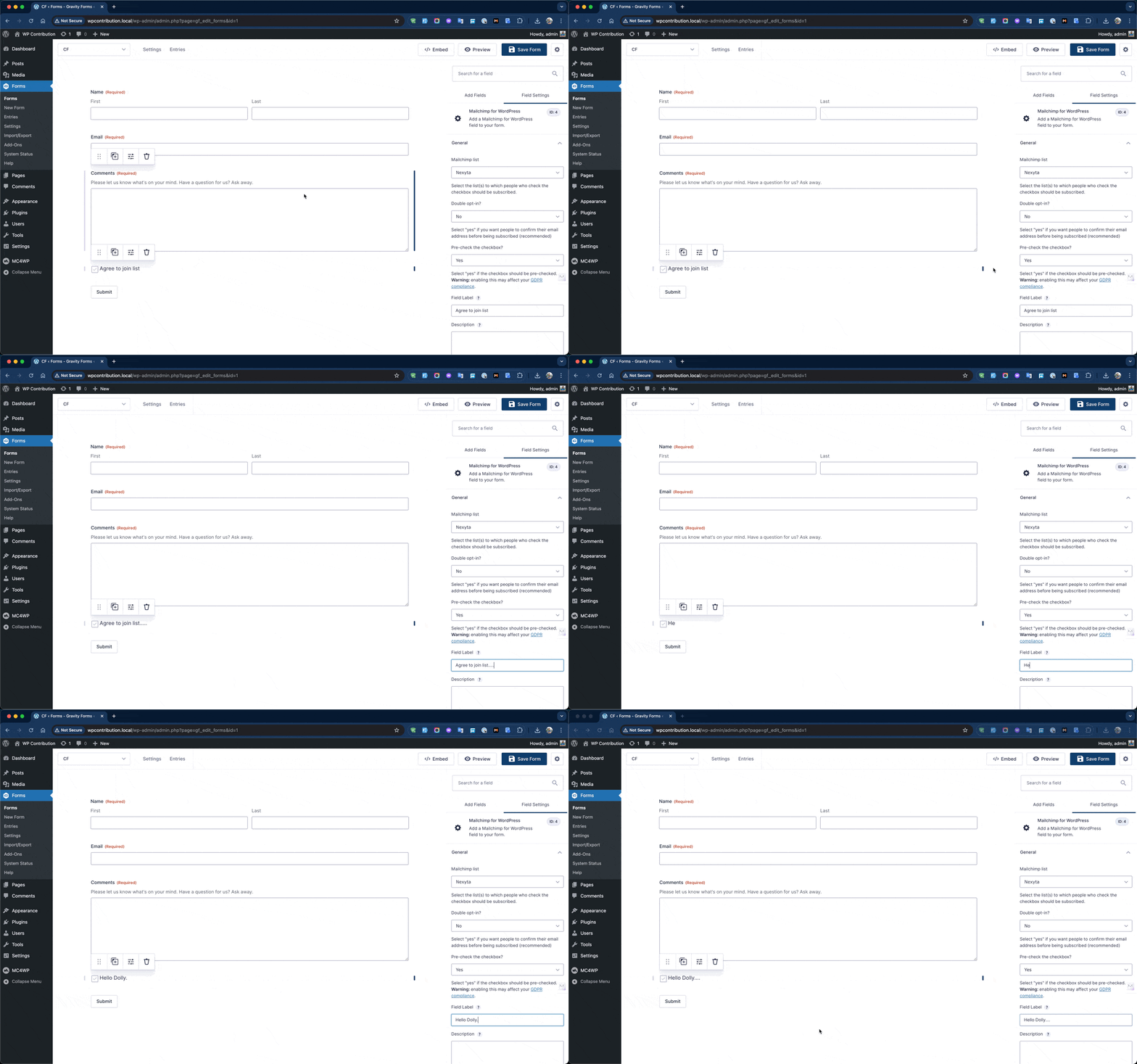
When building a form in Gravity Forms and editing the label of the MC4WP field, the change only appeared after you saved the form and reloaded the page. It did not update live in the editor preview.
The root cause was specific. MC4WP deliberately overrides get_field_content() in its Gravity Forms field class to skip the standard label wrapper. It does this to avoid a duplicate label appearing next to the checkbox. However, Gravity Forms’ own JavaScript relies on that standard structure to perform live updates in the editor. Since the structure was missing, the live update silently failed.
Instead of reverting the PHP method and creating a duplicate label problem, I added a targeted JavaScript hook using Gravity Forms’ gform_post_set_field_property action. When the label property of a mailchimp field changes in the editor, the hook finds the checkbox label in the preview and updates its text directly. The fix is confined to the admin editor and has zero impact on the frontend.
Danny van Kooten’s response after reviewing: “Love it.”
Simple Basic Contact Form Integration (PR #820)
Simple Basic Contact Form (SBCF) is a lightweight contact form plugin. Before this PR, MC4WP had no integration with it. Users who relied on SBCF for their contact forms had no built-in way to offer a MailChimp subscribe option.
I created a new MC4WP_Simple_Basic_Contact_Form_Integration class, following the same pattern used by the existing Contact Form 7 and Comment Form integrations. It hooks into two SBCF extension points: scf_filter_contact_form to inject the opt-in checkbox into the form before the closing tag, and scf_send_email to process the subscription after the email is successfully sent.
The approach uses MC4WP_Field_Guesser on the posted data to automatically map form fields to MailChimp merge fields, with the sender’s email address as a reliable fallback. All 54 existing tests passed after this change with no regressions.
Ninja Forms Required Validation Fix (PR #821)
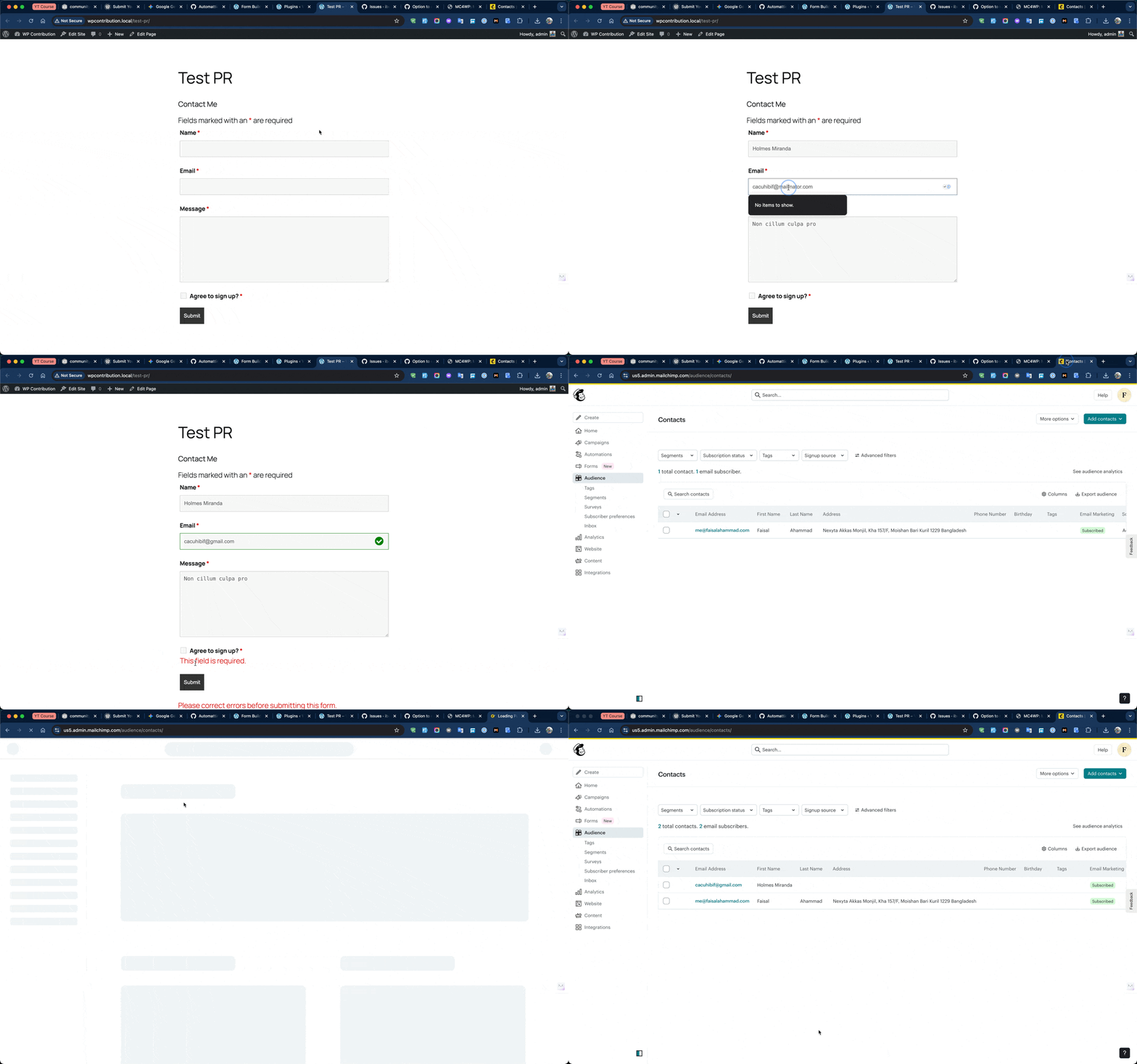
In Ninja Forms, form builders can mark the MC4WP opt-in checkbox as “Required.” Before this fix, that setting had no effect. A user could leave the checkbox unchecked and still submit the form. The subscription would go through without the user’s explicit consent.
The root cause was that MC4WP_Ninja_Forms_Field did not have a custom validate() method. Ninja Forms treats an unchecked checkbox as a value of 0, and the parent class validation did not treat this as a failed “required” check.
I added a validate() method that checks two things: whether the required flag is set, and whether the submitted value is empty or 0. If both are true, it returns a validation error that blocks form submission. I also added three unit tests covering the required-empty, required-checked, and optional-unchecked cases.
PeepSo Registration Form Integration (PR #822)
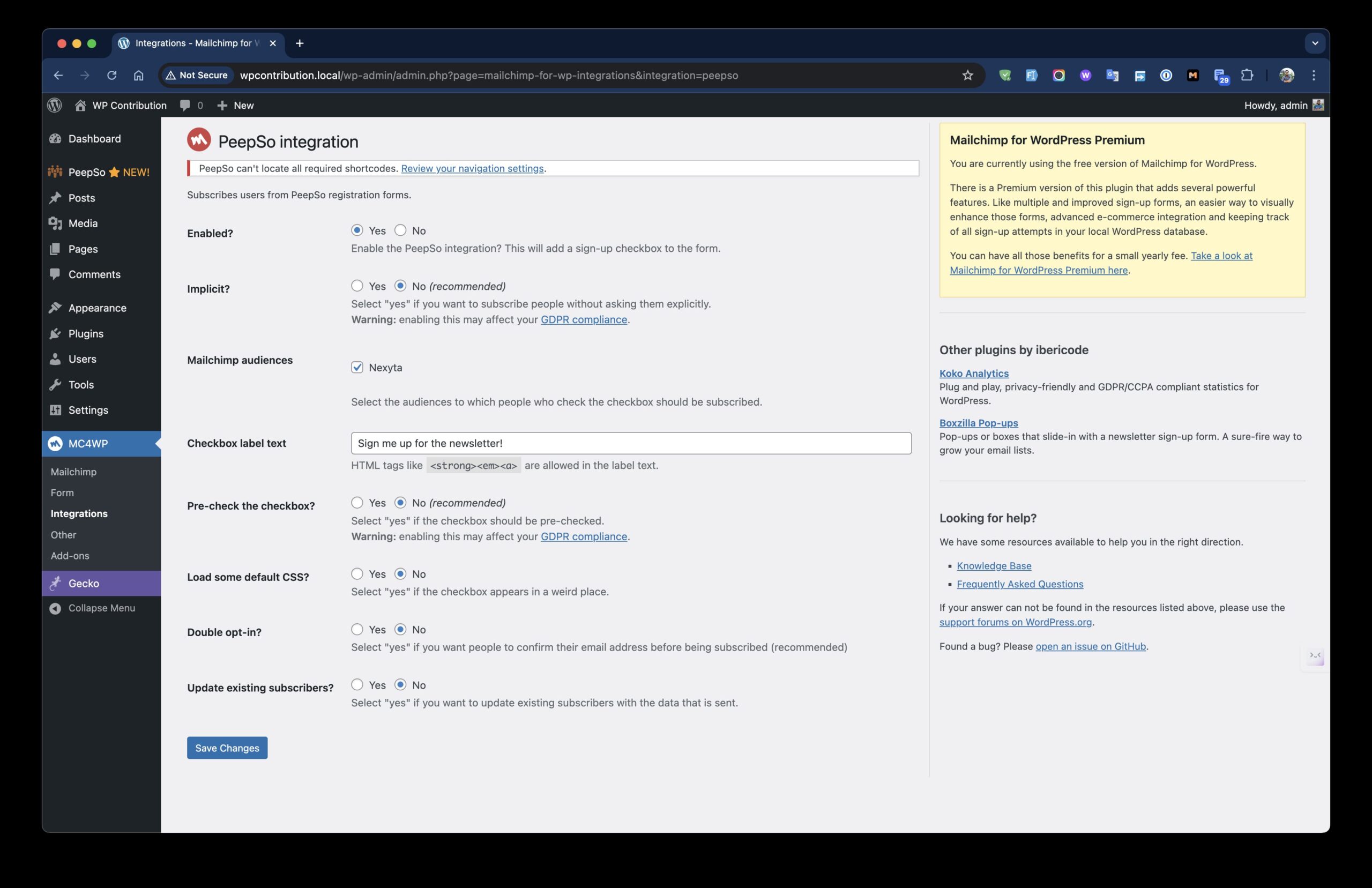
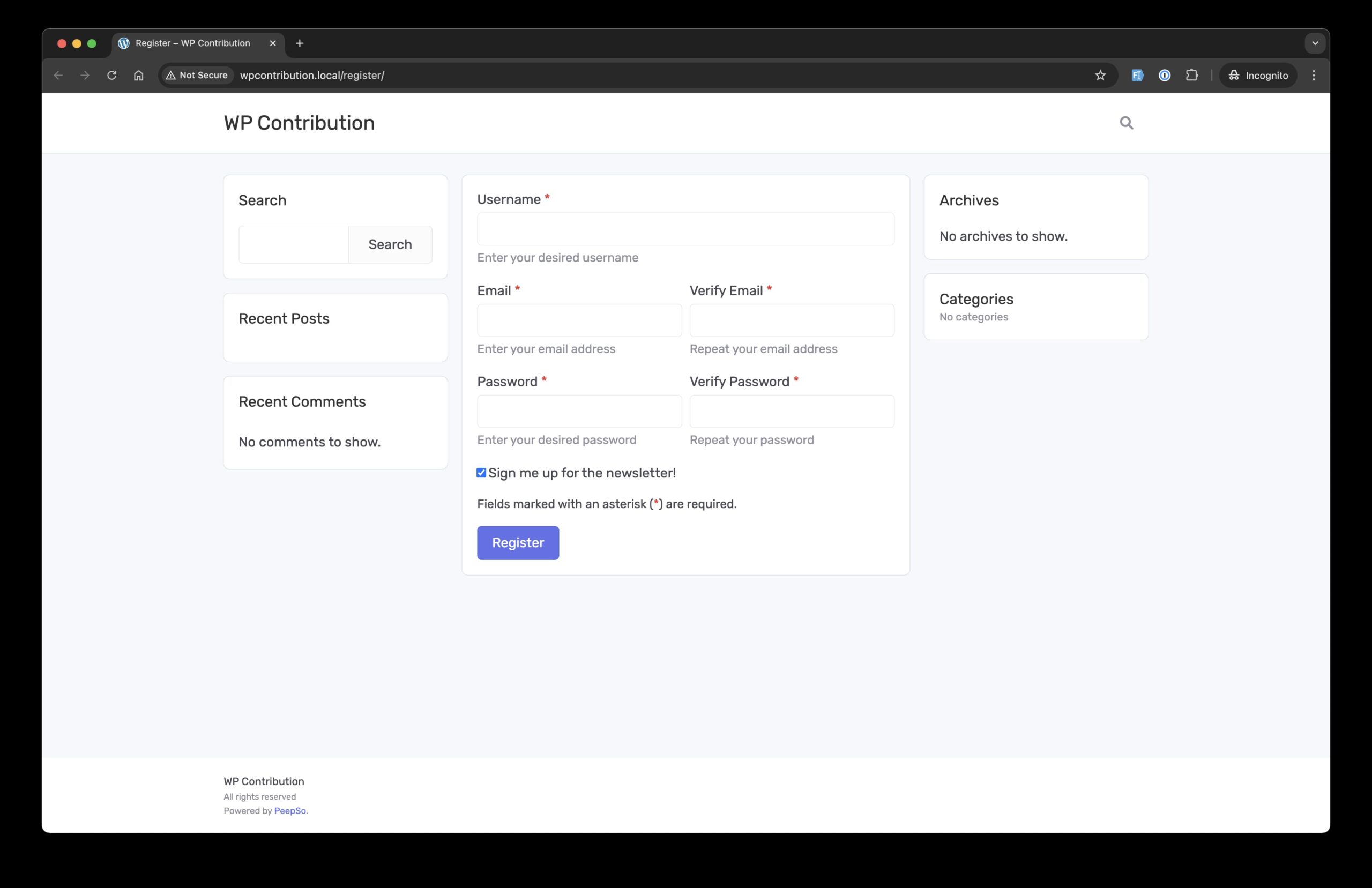
PeepSo is a community plugin that adds social networking features to WordPress, with its own user registration flow. Before this PR, there was no way for users registering through PeepSo to opt into a MailChimp list during that process.
I created a new MC4WP_PeepSo_Integration class extending MC4WP_User_Integration, the same base class used by the BuddyPress integration. It hooks into peepso_register_extended_fields to output the subscribe checkbox in the registration form, and peepso_register_new_user to process the subscription after the user is created.
The implementation is around 65 lines of code. It inherits all admin UI, double opt-in handling, and MailChimp API logic from the base class. I identified the correct PeepSo hooks by reading through the PeepSo core plugin source code and confirmed them against how the BuddyPress integration was structured.
WPForms Single or Double Opt-In Setting (PR #823)
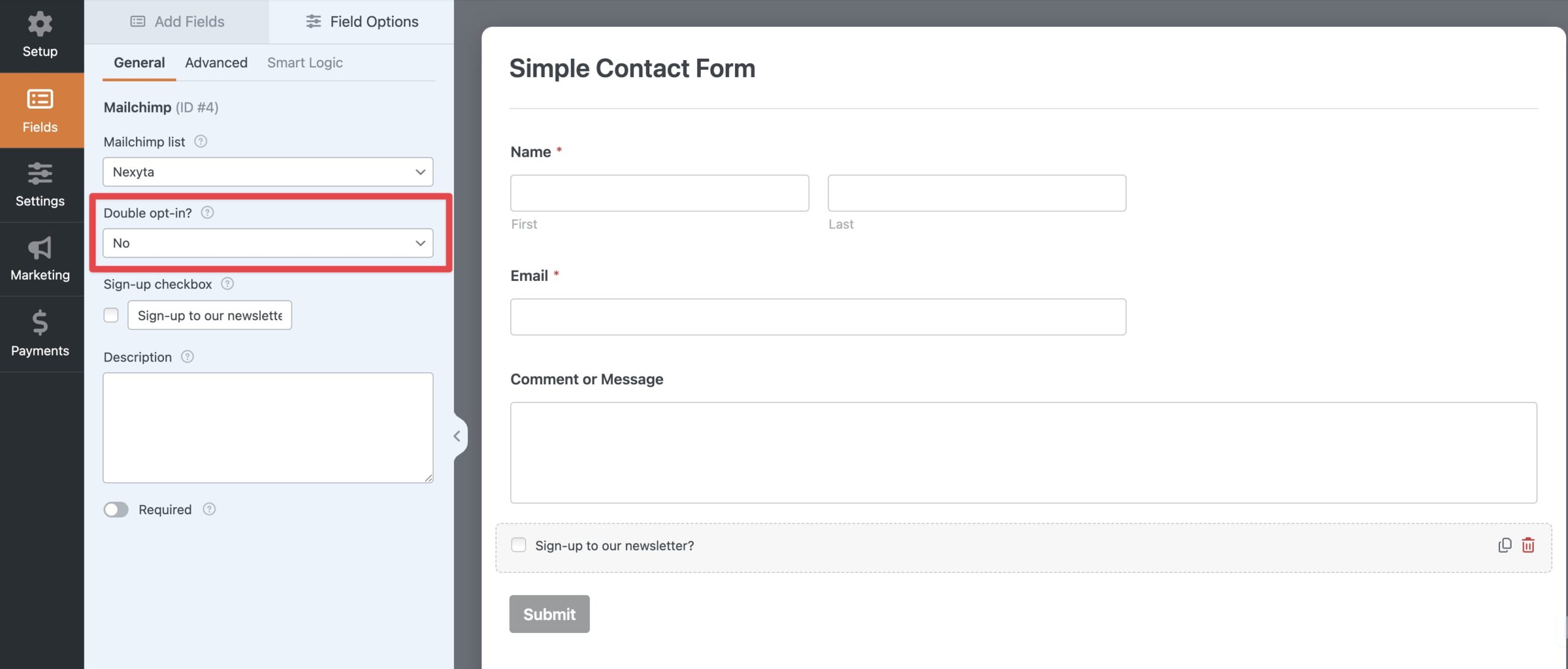
The WPForms integration in MC4WP always used double opt-in, with no way to change it. Site owners who wanted to skip the confirmation email had no option at all. This had been an open GitHub issue since October 2020.
I added a “Double opt-in?” dropdown to the WPForms MailChimp field settings in the form builder. The setting stores a mailchimp_double_optin value per field. During subscription processing, the integration reads this value, temporarily sets it on $this->options['double_optin'], calls subscribe(), then restores the original options. This pattern mirrors how the Gravity Forms integration already handles per-field opt-in control.
I wrote 5 unit tests covering default behavior, single opt-in switching, and options restoration. The test suite grew from 54 to 59 tests.
WP-Cron Behind Schedule Warning (PR #827)
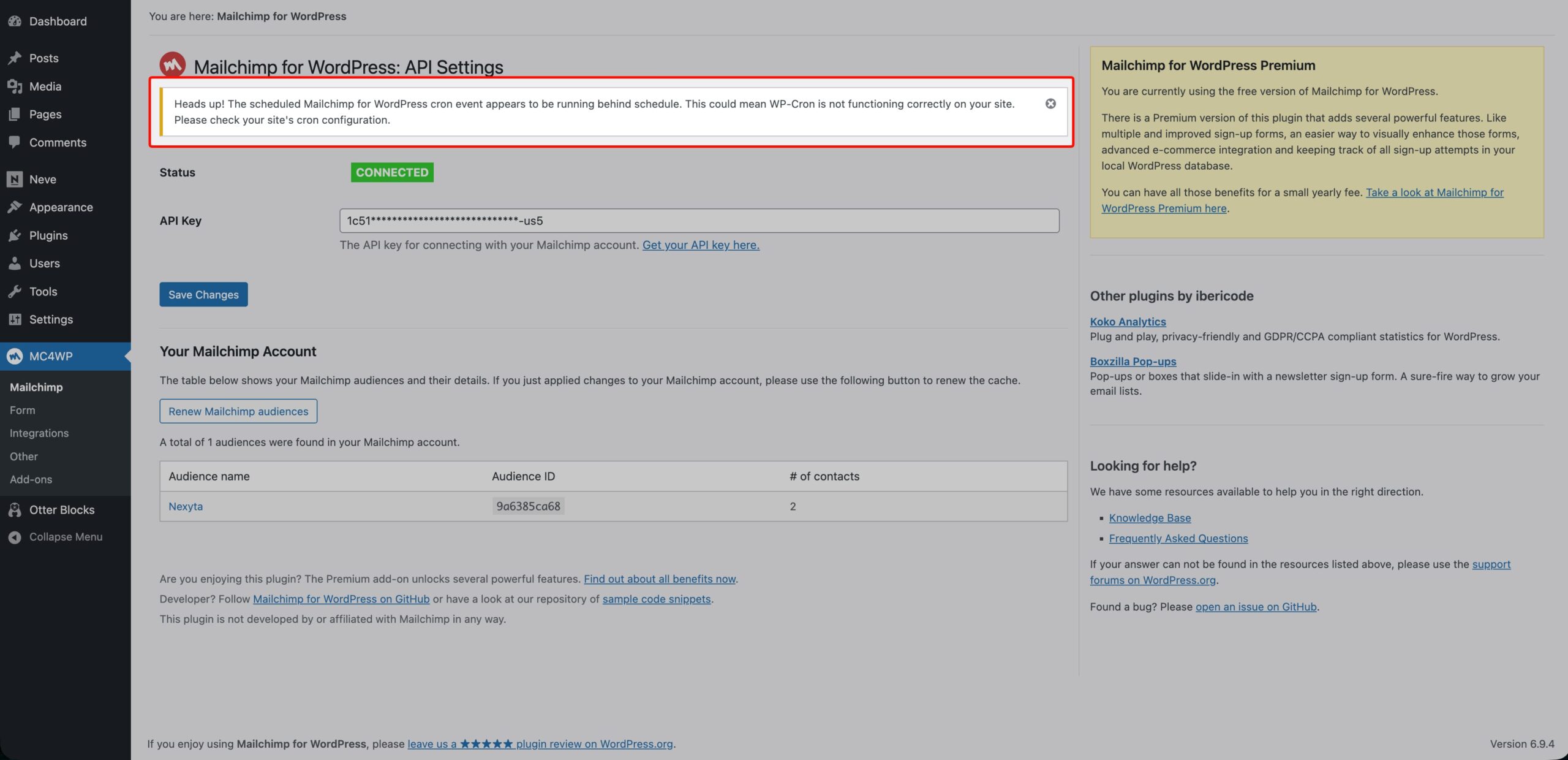
MC4WP uses a scheduled WP-Cron event called mc4wp_refresh_mailchimp_lists to sync MailChimp lists in the background. On some hosting setups, WP-Cron is disabled without a proper server-side cron replacement. When that happens, list syncing silently stops. Site owners have no indication anything is wrong.
I added a new MC4WP_Admin_Cron_Notice class that checks whether the next scheduled run for the refresh event is more than one hour behind schedule. If it is, a dismissible warning notice appears on the plugin’s settings pages. The check uses wp_next_scheduled(), which does not trigger a database write. The one-hour threshold handles normal page-load delays while still catching genuinely broken cron configurations.
MailChimp Site Tracking Pixel Integration (PR #828)
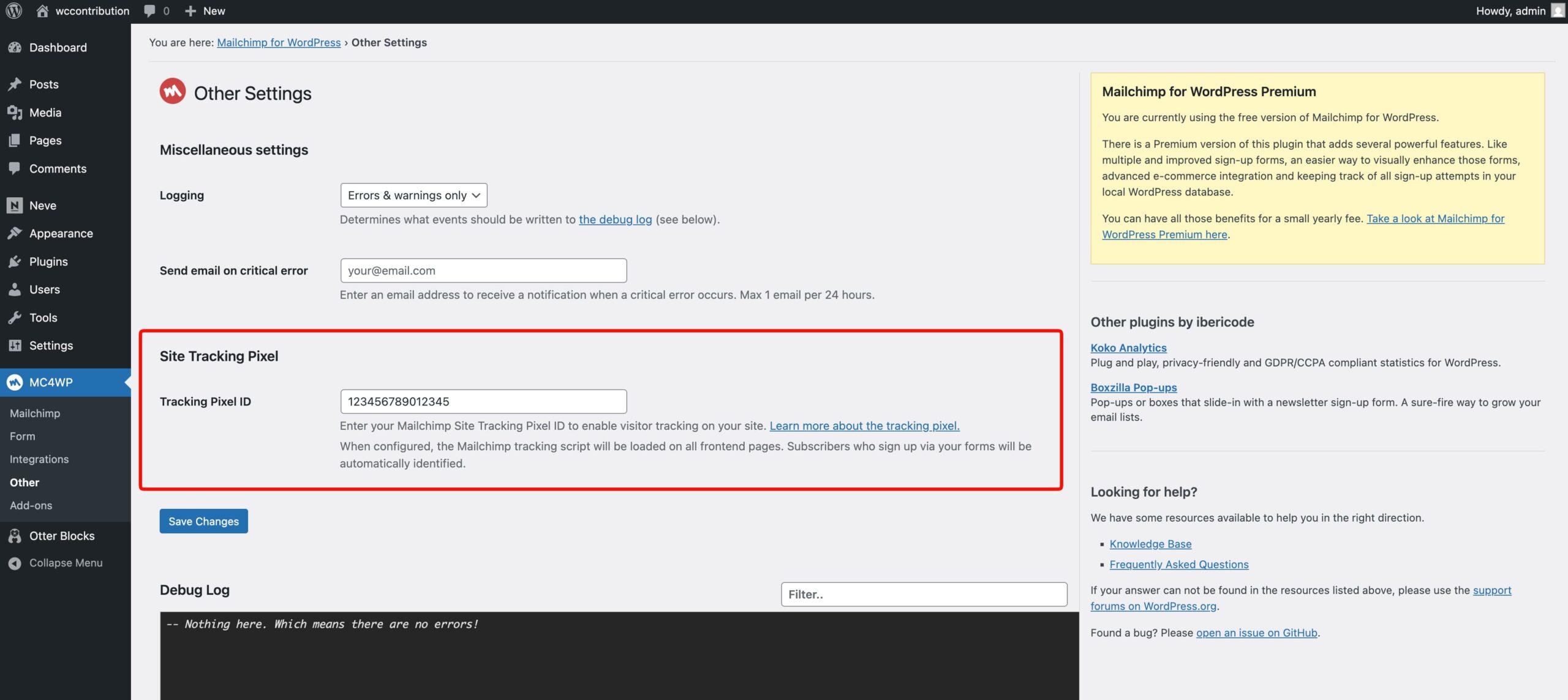
MailChimp provides a client-side JavaScript tracking pixel that connects behavioral web events to audience contacts in MailChimp. Before this PR, there was no built-in way to enable it through MC4WP. Users had to manually copy and paste the script into their theme.
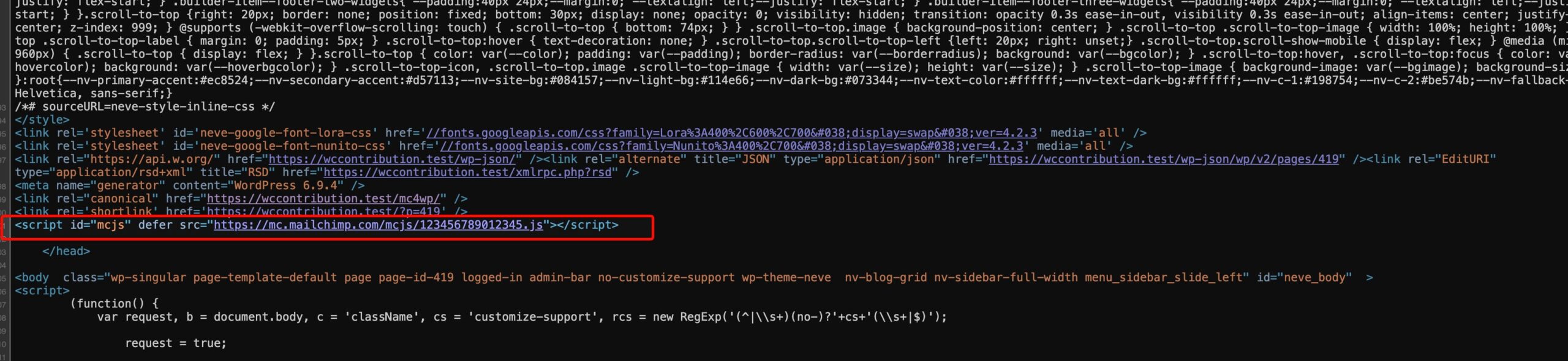
I created a MC4WP_Tracking_Pixel class that does two things. First, it outputs the MailChimp pixel <script> tag in wp_head when a Tracking Pixel ID is configured. Second, it hooks into the mc4wp_form_subscribed action. When a user subscribes through an MC4WP form, the class captures their email address and outputs a window.$mcSite.pixel.api.identify() call in wp_footer. This connects the subscriber’s identity to their tracked session in MailChimp.
I also added a Tracking Pixel ID input field to the plugin’s Other Settings page, with proper input sanitization on save.
How I Worked on Each PR
My process was consistent across all 8 pull requests.
I read through open GitHub issues and picked the ones where I understood the problem and could see a clear solution. For each one, I forked the repository, cloned it locally, and created a separate feature branch, one branch per issue only.
I tested every change manually in a local WordPress environment. For the Ninja Forms and WPForms PRs, I also wrote PHPUnit unit tests to cover the new behavior. I included screenshots and screen recordings in my PR descriptions so the maintainer could verify the change visually without setting up a test environment.
Some PRs were merged directly. Others received one round of review feedback. Danny’s comments were always specific and easy to act on.
The time varied. Some PRs took a few hours. Others, like the PeepSo integration, took longer because I had to trace through two separate plugin codebases to identify the right hooks and confirm how each fires.
Credited on WordPress.org
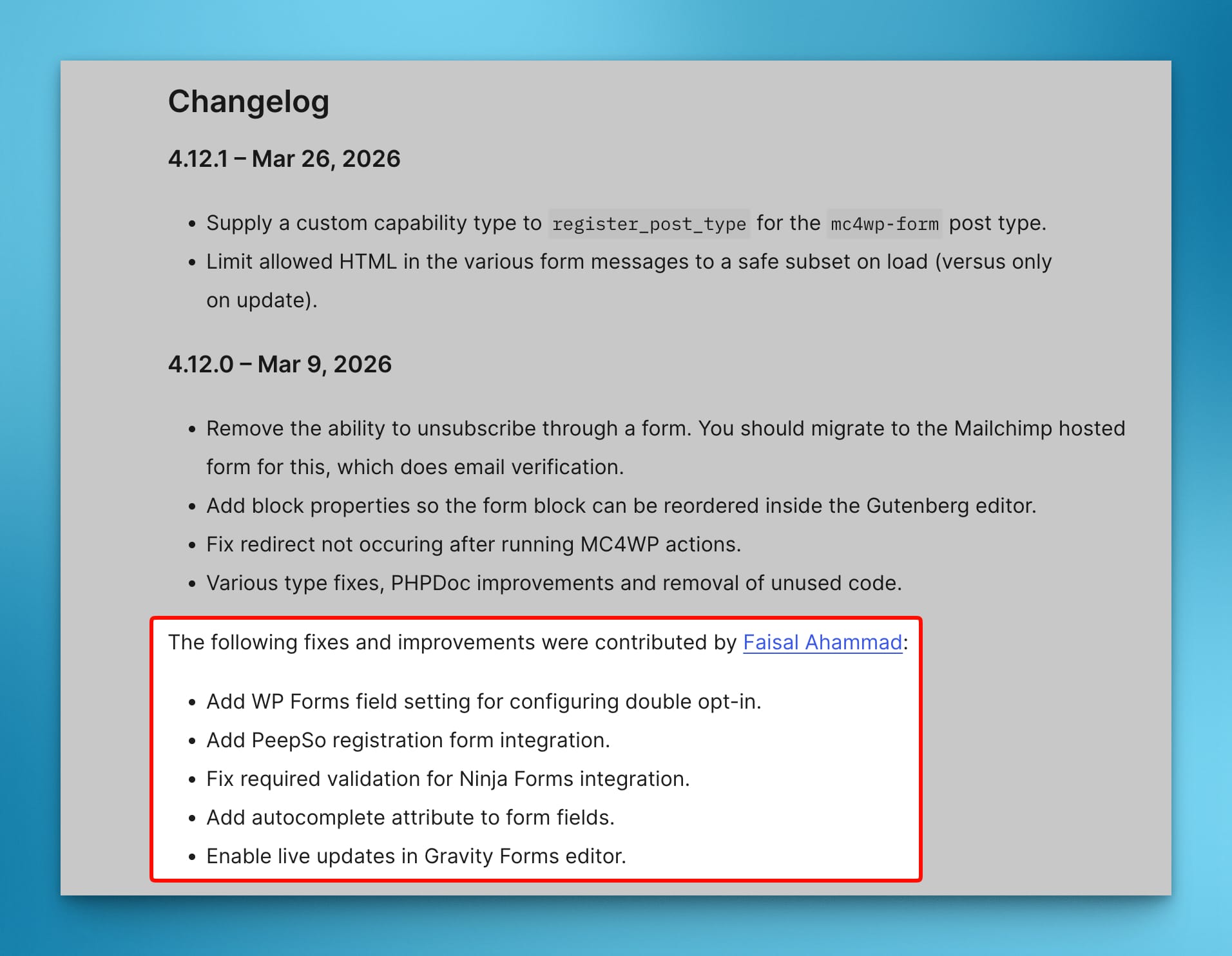
My contributions are credited by name in the official MC4WP changelog on WordPress.org, under the “Developers” tab on the plugin page.
When Danny asked where to credit me after merging PR #823, I asked for a link to my personal website and my WordPress.org username. Seeing that credit in a public changelog for a plugin with 900,000 active installs is a different kind of satisfaction from closing a support ticket. The work is reviewed, public, and permanent.
What Open Source Contributions Mean to Me
Contributing to open source is not something I started for a resume line. I care about WordPress and the community around it. When I was at Saturday Drive working on Ninja Forms, I regularly saw users who relied on MC4WP. Some of them hit the exact bugs I later fixed. The connection between support work and open source contribution is real and direct.
Open source work is also honest portfolio work. You cannot fake a merged pull request. The code is public. The review thread is public. The credit is in a changelog that will outlast any job title.
I plan to keep contributing to MC4WP. There are still open issues I want to tackle, and the plugin continues to evolve.
How You Can Start Contributing to WordPress Plugins
If you want to make your own WordPress open source contributions, the path is more straightforward than it might look.
Start with a plugin you already use or know well. Familiarity with what a plugin does is more useful than picking a popular one you have never worked with. Browse its GitHub repository and read through the open issues. You do not need a “good first issue” label. Look for a problem you understand and can trace to a specific part of the code.
Fork the repository. Set up a local WordPress environment. Create a branch for that one issue. Test your change before you submit. Write a short PR description that explains the problem and what your fix does. The maintainer will appreciate the context.
The first PR is the hardest. After that, the pattern repeats and the process gets faster.
The Work Speaks for Itself
Eight pull requests. New integrations for PeepSo, Simple Basic Contact Form, and the MailChimp tracking pixel. Bug fixes for Gravity Forms, Ninja Forms, and WPForms. Better UX through autocomplete attributes. Proactive admin notices for broken cron configurations. All merged into a plugin running on nearly a million WordPress sites.
Browse my pull requests on my GitHub profile, see the credited changelog on MC4WP on WordPress.org, and learn more about my work at faisalahammad.com and my WordPress.org profile.
If you have been thinking about contributing to open source, pick one issue today. Submit one PR. That is enough to start.










Leave a Reply