
February 2026 was a busy month. I shipped 11 pull requests across four popular WordPress plugins. Each PR had its own story.
Some fixes were small. One line of code. Others needed whole new integration classes. All of them taught me something new.
This is the story of that month.
Let me walk you through each contribution, the problems behind them, and the code that fixed them.
Mailchimp for WordPress: Small Fixes That Improve Daily Use
Most of my contributions went to MC4WP: Mailchimp for WordPress. This plugin helps millions of sites connect their forms to Mailchimp. I worked on 6 PRs for it in February.
Autocomplete Attributes for Form Fields (PR #816)
This one started as a simple idea. When users fill out a newsletter signup form, browsers can autofill their info. But only if the form fields have the right autocomplete attributes.
The Email field needed autocomplete="email". First Name needed autocomplete="given-name". Last Name needed autocomplete="family-name".
Without these attributes, password managers and browsers guess what each field is. Sometimes they guess wrong.
The fix was small. In the field generator, I added this check:
// Add autocomplete attribute if properly configured
if (config.autocomplete && config.autocomplete.length > 0) {
    attributes.autocomplete = config.autocomplete;
}
Three lines of code. But they make the form experience smoother for everyone who visits a site using this plugin.
Live Label Updates in Gravity Forms (PR #818)
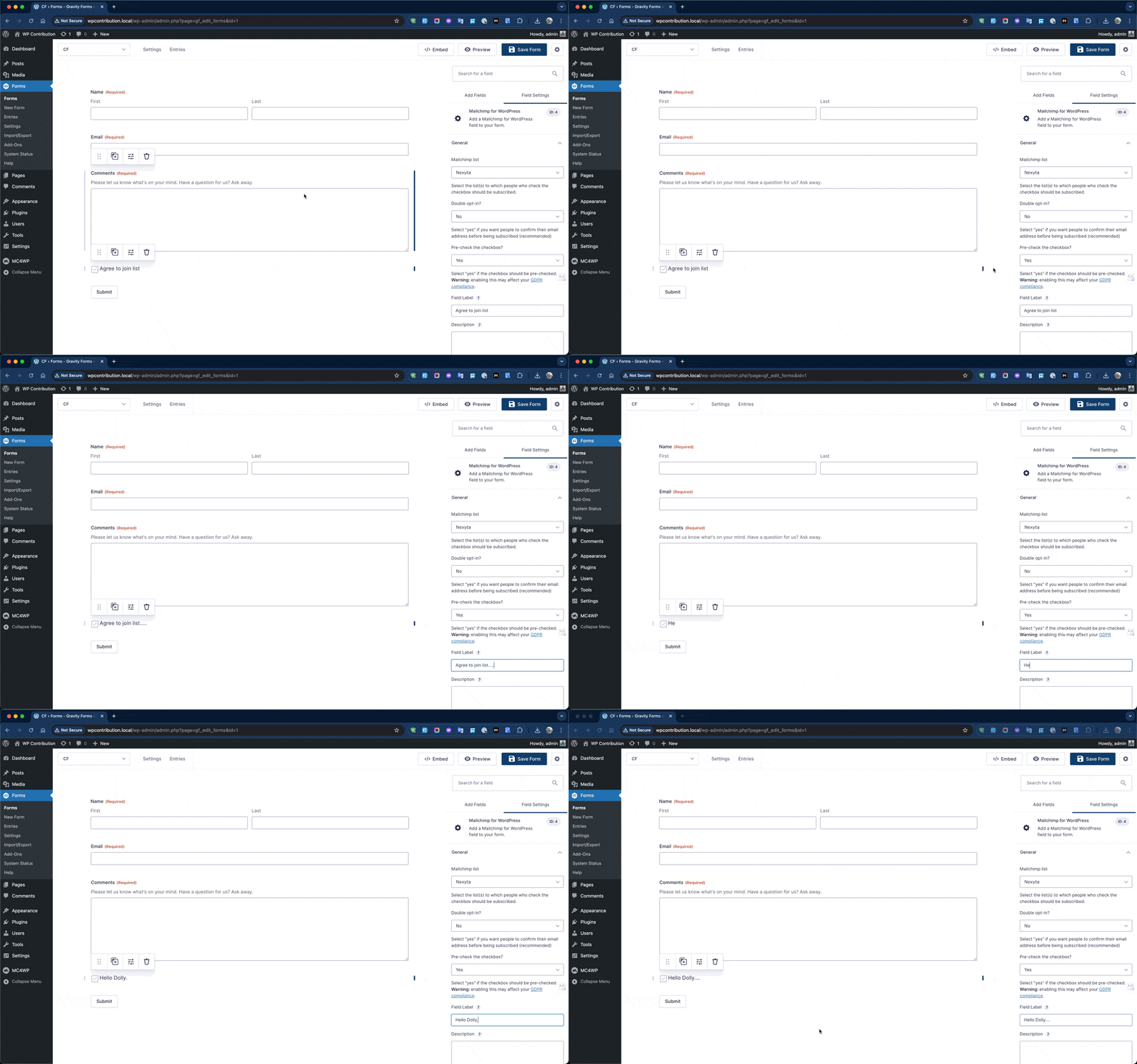
Bug reports tell the best stories. A user reported that when you edit the Mailchimp field label in Gravity Forms, the preview does not update until you save and refresh the page.
That is annoying. Especially when you are building a form and want to see changes instantly.
The root cause was interesting. The MC4WP field overrides get_field_content() to remove the standard label wrapper. This is intentional. The checkbox itself contains the label text. But Gravity Forms editor JavaScript expects that standard label structure to do live updates.
The fix did not touch PHP at all. I added a small JavaScript hook:
if (window.gform) {
    gform.addAction('gform_post_set_field_property', function(name, field) {
        if (name === 'label' && field.type === 'mailchimp') {
            jQuery('#field_' + field.id + ' .gfield_checkbox label').text(field.label);
        }
    });
}
This listens for label changes and updates the preview text directly. The frontend markup stays clean. No duplicate labels. No breaking changes.
Required Checkbox Validation in Ninja Forms (PR #821)
Another bug. This time in Ninja Forms. Users could mark the Mailchimp checkbox as Required, but the form would still submit even when the box was unchecked.
The problem was simple. Unchecked checkboxes send a value of 0. The parent class did not treat 0 as empty, so the required validation passed.
I added a validate() method to the field class:
public function validate($field, $data) {
    $errors = parent::validate($field, $data);

    if (isset($field['required']) && 1 == intval($field['required'])
        && empty($field['value'])) {
        $errors['slug'] = 'required-error';
        $errors['message'] = esc_html__('This field is required.', 'mailchimp-for-wp');
    }

    return $errors;
}
Now when a user tries to submit without checking the box, they see a clear error message. The form does not go through.
Single or Double Opt-in for WPForms (PR #823)
The WPForms integration had a limitation. It always used double opt-in. That means every new subscriber gets a confirmation email before they are added to the list.
But not every use case needs double opt-in. Sometimes you want people subscribed right away.
I added a per-field setting. A simple Yes/No dropdown in the WPForms field builder.
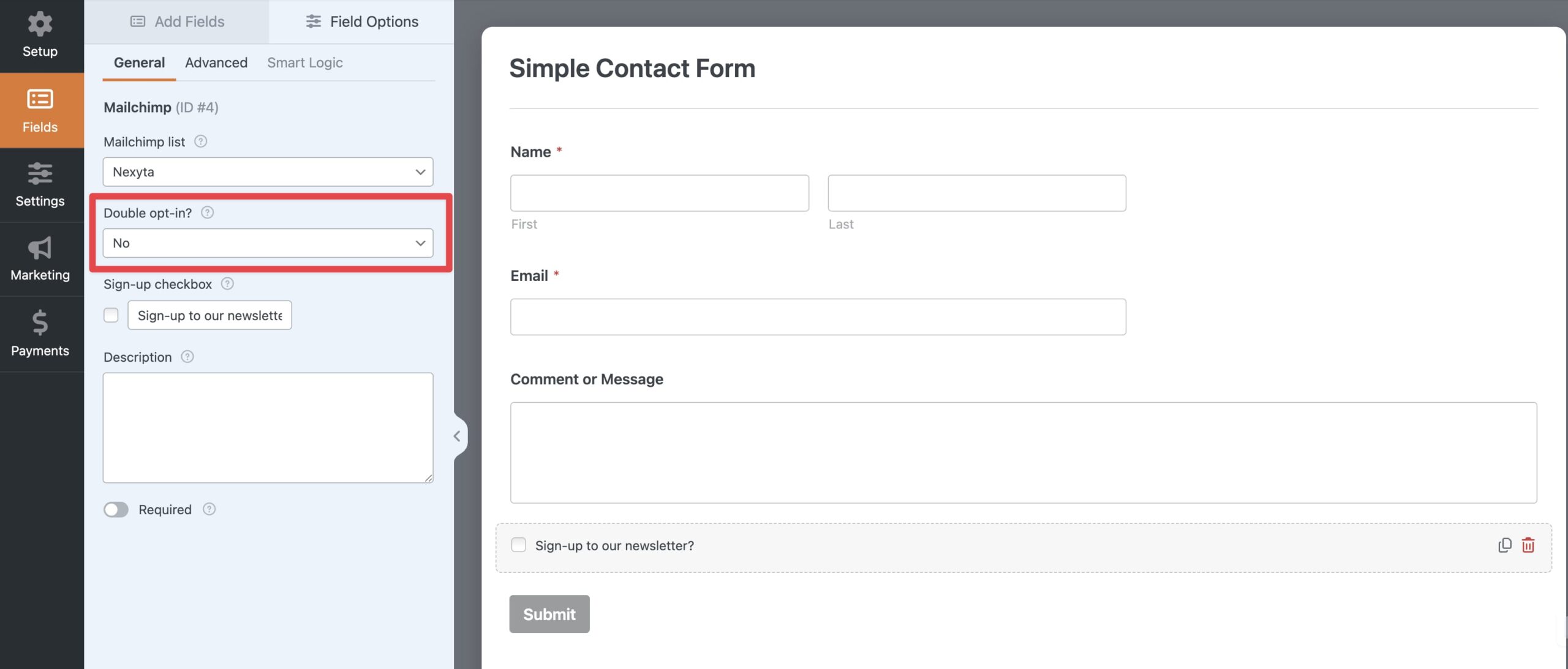
The logic that applies this setting looks like this:
$double_optin = isset($field_config['mailchimp_double_optin'])
    ? $field_config['mailchimp_double_optin']
    : '1';

$orig_options = $this->options;
$this->options['lists'] = [$mailchimp_list_id];
$this->options['double_optin'] = $double_optin;

// ... subscribe ...

$this->options = $orig_options;
I made sure to restore the original options after the subscription call. This prevents the per-field setting from leaking into other forms processed on the same page.
Two New Plugin Integrations (PR #820 and PR #822)
February also brought two new integrations.
Simple Basic Contact Form (PR #820) — A lightweight contact form plugin without Mailchimp support. I built an integration class that injects an opt-in checkbox into the form and processes subscriptions when the form is submitted.
PeepSo Registration Form (PR #822) — PeepSo is a community plugin. When users register through PeepSo, they can now opt in to a Mailchimp newsletter. The integration follows the same pattern as the existing BuddyPress integration.
Both PRs passed all 54 existing tests with zero regressions.
LiteSpeed Cache: Stopping an Infinite Refresh Loop (PR #953)
This one was wild. A user reported that their site kept reloading endlessly. The browser could not stop.
The root cause was a caching problem. LiteSpeed Cache uses a file called guest.vary.php to set a cookie for guest users. But when this file got cached by a third-party service (like Archive.org), the cookie never got set. The JavaScript kept seeing {"reload":"yes"} and kept reloading the page.
Infinite loop.
The fix had two parts.
First, I added a JavaScript guard using sessionStorage:
// Guard against infinite reload loop
if (sessionStorage.getItem('litespeed_reloaded')) {
    console.log('LiteSpeed: skipping guest vary reload (already reloaded this session)');
} else {
    // ... fetch logic ...
    if (data.hasOwnProperty('reload') && data.reload == 'yes') {
        sessionStorage.setItem('litespeed_docref', document.referrer);
        sessionStorage.setItem('litespeed_reloaded', '1');
        window.location.reload(true);
    }
}
Second, I added proper Cache-Control headers to guest.vary.php:
header('Cache-Control: no-store, no-cache, must-revalidate, max-age=0');
header('Pragma: no-cache');
This tells external caches not to store the response. The JavaScript guard ensures that even if a cached response slips through, the browser only reloads once per session.
Pods Framework: Two Bug Fixes (PR #7487 and PR #7485)
The Infinite Loop in React Quill (PR #7487)
This bug was tricky. When you import content using WordPress XML import, repeatable WYSIWYG fields using React Quill would become uneditable. The browser console showed React error #185: Maximum update depth exceeded.
The root cause lived in how the onChange handler worked:
// BEFORE - causes infinite loop
<ReactQuill value={value || ''} onChange={setValue} />
When ReactQuill mounts, it fires onChange with the initial value. That calls setValue, which triggers a re-render. ReactQuill sees the “new” value and fires onChange again. Loop.
The fix was to check the source parameter:
// AFTER - no infinite loop
<ReactQuill
    value={value || ''}
    onChange={(content, delta, source) => {
        if (source === 'user') {
            setValue(content);
        }
    }}
/>
The source parameter tells us who initiated the change. 'user' means the person typing. 'api' means a programmatic change. We only update state when the user actually edits the content.
PHP Warnings with Taxonomy Sync (PR #7485)
This fix stopped a cascade of PHP warnings. When you enable “Sync associated taxonomy” on a relationship field without setting up a bidirectional relationship, the code tried to access array offsets on a null value.
The fix reordered the logic. Taxonomy sync runs first because it does not need the bidirectional relationship data. Then the function returns early if no bidirectional relationship exists.
// Handle syncing of taxonomy terms first
if (!empty($pod['type']) && 'post_type' === $pod['type']
    && !empty($options[static::$type . '_sync_taxonomy'])) {
    // taxonomy sync code - runs independently
}

// Exit early if no bidirectional relationship
if (empty($related_field) || empty($related_pod)) {
    return;
}
This PR also included a bonus feature. I added a “Save Value When Hidden” option for conditional fields. When a field is hidden by conditional logic, its value can now be preserved instead of being reset.
Ultimate Member: Security and Translation Fixes (PR #1788 and PR #1789)
Fixing Broken Translations (PR #1788)
This was a classic WordPress i18n mistake. The code used this pattern:
printf(__('%s', 'ultimate-member'), $text);
This does not work for translations. The __() function sees only the literal string %s. It never sees the actual message content. So translations of admin-configurable messages never applied.
I replaced these patterns across five files with direct output using wp_kses_post():
echo wpautop(wp_kses_post($text));
wp_kses_post allows safe HTML (like bold text or links) while stripping malicious scripts. This is the WordPress standard for outputting trusted content from admin settings.
Stronger Passwords with Special Characters (PR #1789)
The last PR of the month added an optional setting. Site admins can now require at least one special character in user passwords.
The change to strong_pass() was minimal:
function strong_pass($candidate, $require_special_character = false) {
    $regexps = [...];

    if ($require_special_character) {
        $regexps[] = '/[^\p{L}\p{N}\s]/u';
    }
    // ...
}
A single regex pattern. It checks for any character that is not a letter, number, or whitespace. When enabled, passwords like Password123 get rejected. Password123! passes.
The default is off. Backward compatibility is fully preserved.
What I Learned from February 2026
Looking back, these 11 PRs share a common thread. Most of them are about edge cases. The things that happen when someone uses a plugin in a way the original developer did not expect.
A cached response causing infinite reloads. A translation function that silently fails. A React component that loops on itself. A checkbox that submits with value 0 instead of empty.
These are the bugs that frustrate users the most. They are hard to reproduce and harder to diagnose. But fixing them makes the software better for everyone.
I also learned that the smallest changes often have the biggest impact. Three lines of JavaScript for autocomplete attributes. One regex pattern for password security. A sessionStorage flag to stop an infinite loop.
Open source is not about writing the most code. It is about writing the right code.
Your Turn
Do you maintain a WordPress plugin? Look at your issue tracker. Find the bug that has been open the longest. The one that seems too small to bother with. Fix it. Write a test for it. Submit a PR.
That is how open source grows. One small fix at a time.
What will you contribute this month?
If you found this recap useful, share it with someone who contributes to WordPress plugins. Or check out my other articles on this blog for more behind-the-scenes stories of open source development.











Leave a Reply