

March came and went fast. But before the month slipped away, I managed to ship two features that I am genuinely proud of. This is my open source contribution recap March 2026, a snapshot of what I built, why I built it, and what the experience taught me.
It was 3:47 PM on a Wednesday when the first notification hit my inbox.
[ibericode/mailchimp-for-wordpress] Pull request #828 merged
I stared at it for a second. Then another notification came through, barely ten minutes apart. PR #827 merged. Danny van Kooten, the maintainer behind one of WordPress’s most widely used marketing plugins, had merged both of my contributions in a single afternoon.
I leaned back and smiled. That feeling never gets old.
If you have ever contributed to an open source project, you know exactly what I mean. If you have not, this open source contribution recap March 2026 might change your mind. These are the stories behind two practical features I shipped for the Mailchimp for WordPress plugin. No fluff. Just real code, real problems, and what I learned from solving them.
Why Mailchimp for WordPress?
Mailchimp for WordPress powers email marketing on over two million WordPress sites. It handles form subscriptions, e-commerce tracking, and audience syncing, all from inside the WordPress admin.
But here is the thing about mature plugins: they carry years of user expectations. Every new feature request comes with a story of frustration. Someone, somewhere, lost hours to a problem that the plugin could have prevented.
That is where open source contributors come in. We read the issues. We reproduce the bugs. We write the patches.
In March, I worked on two issues that stood out to me. One added a missing integration. The other built a safety net that should have existed years ago. Both became part of my WordPress plugin development journey this month.
The Tracking Pixel Adventure
Imagine this scenario.
You connect your WordPress site to Mailchimp. Your forms work perfectly. Subscribers flow into your audience like clockwork. But when you check your Mailchimp dashboard, the behavioral data is empty. No page views. No click tracking. Nothing.
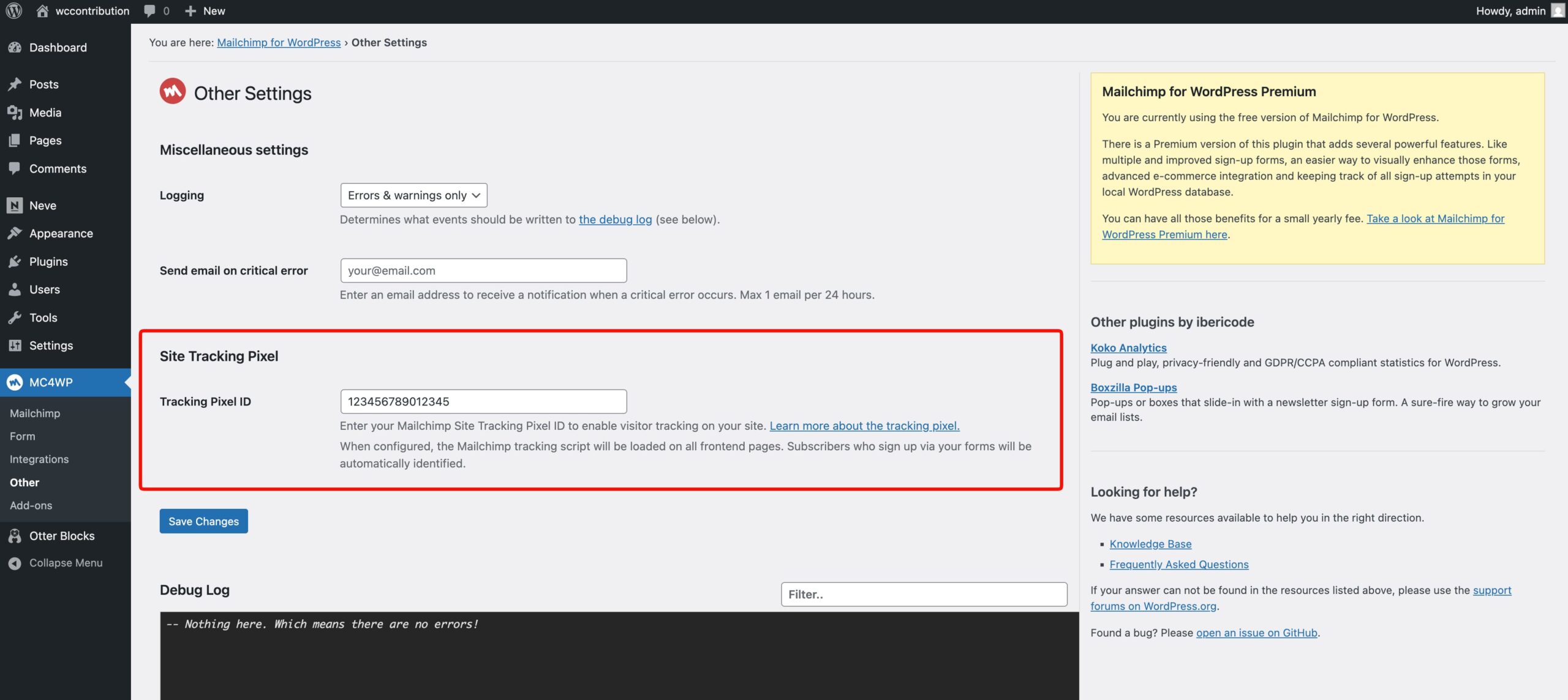
You read the docs and discover you need the Mailchimp Site Tracking Pixel. But there is no setting for it in the plugin. The only option is to manually inject a script tag into your theme, which is fragile, messy, and not something a non-technical user should ever touch.
Issue #824 captured exactly this problem. Users needed a built-in way to add the site tracking pixel. More importantly, they needed the pixel to identify subscribers after a form submission, so Mailchimp could connect anonymous page views to known contacts.
I saw this and thought: a plugin with two million installs should handle this out of the box.
Building the Solution
The architecture was clear. I needed three things to work together.
First, inject the tracking script into the page head when the user provides their tracking ID. Second, capture the subscriber’s email address immediately after a successful form submission. Third, output an identification call in the footer so Mailchimp ties the browsing session to the right contact.
Here is how the class signature and hook registration came together:
class MC4WP_Tracking_Pixel {

    private string $site_id;
    private string $identify_email = '';

    public function add_hooks(): void
    {
        add_action('wp_head', [$this, 'output_tracking_script']);
        add_action('mc4wp_form_subscribed', [$this, 'capture_subscriber_email'], 10, 2);
        add_action('wp_footer', [$this, 'output_identify_script'], 99);
    }
}
Three hooks. Three responsibilities. Each one clean and testable in isolation.
The capture_subscriber_email method is deceptively simple, but it unlocks the entire feature. When a visitor subscribes through any MC4WP form, the plugin fires mc4wp_form_subscribed with the form object and the verified email address. My method stores that email in memory for the duration of the request:
public function capture_subscriber_email($form, string $email): void
{
    $this->identify_email = $email;
}
Then, just before the closing </body> tag, the identify script fires:
public function output_identify_script(): void
{
    if (empty($this->identify_email) || empty($this->site_id)) {
        return;
    }

    $script  = '<script>';
    $script .= 'window.$mcSite = window.$mcSite || {};';
    $script .= sprintf(
        '$mcSite.pixel.api.identify({type:"EMAIL",value:"%s"});',
        esc_js($this->identify_email)
    );
    $script .= '</script>';

    echo $script . "\n";
}
Notice the esc_js() call. Even in a feature PR, security is non-negotiable. I made sure every user-provided value passed through proper WordPress escaping functions.
The result? A plugin user copies their tracking ID from Mailchimp, pastes it into the new settings field in WordPress, and everything just works. No theme edits. No code snippets. No guesswork.
The Extra Mile: Auto-Discovery
What I have not mentioned yet is the part I am most proud of. The plugin can also auto-discover your Mailchimp connected site through the API.
The fetch_or_create_connected_site method queries your Mailchimp account, looks for a connected site matching your WordPress domain, and returns the tracking ID automatically. If no matching site exists, it creates one for you, reusing the e-commerce store ID when available so Mailchimp links everything together.
This turned the feature from “here is a field, paste your ID” into “we found your ID, nothing to configure.” That is the kind of user experience every plugin should aim for.
The Cron Detective Story
The second contribution started with a quieter problem. A problem that does not throw errors. A problem that sits in the background and silently lets things break.
WordPress relies on a system called WP-Cron to run scheduled tasks. The Mailchimp for WordPress plugin uses it to refresh audience lists periodically. When WP-Cron works, everything hums along. When it breaks, list data goes stale. Subscriber counts drift. Forms still work, so nobody notices until the discrepancies become obvious.
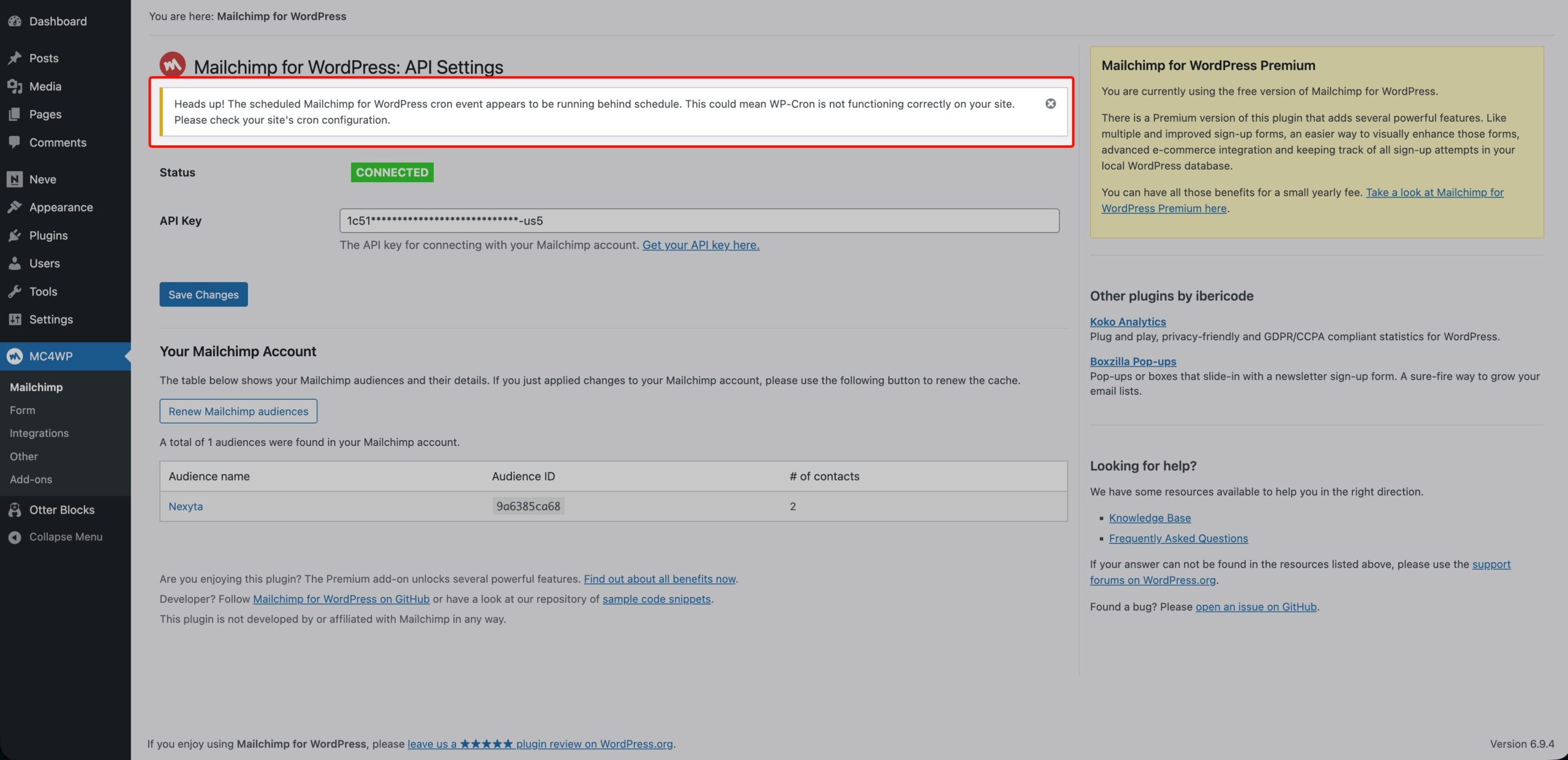
Issue #826 asked for a warning when WP-Cron falls behind schedule. I thought about the typical WordPress site owner. They configure DISABLE_WP_CRON in their wp-config.php, following a performance guide they found on Google. They forget to set up a server-level cron job. Months pass. Their Mailchimp data rots and they have no idea why.
This needed a safety net. A proper WP-Cron warning notice that catches the problem before it costs someone their data.
Designing the Warning System
The logic at the heart of the feature fits into a single method:
public function is_cron_behind_schedule(): bool
{
    $next_scheduled = wp_next_scheduled('mc4wp_refresh_mailchimp_lists');

    if ($next_scheduled === false) {
        return false;
    }

    return $next_scheduled < (time() - HOUR_IN_SECONDS);
}
That is it. Fifteen lines of code that can save someone hours of debugging.
The method asks WordPress a simple question: “When is the next list refresh scheduled?” If the answer is more than one hour in the past, we have a problem. A healthy WP-Cron system reschedules events before they fire, so a properly running site will never have a scheduled time older than a few minutes.
I chose a one-hour threshold deliberately. Tighter windows would generate false positives on sites with low traffic, where WP-Cron only triggers on page visits. But an hour is long enough that something is genuinely wrong.
Scope and Restraint
Good user experience is as much about what you do not show as what you do show. The WP-Cron warning notice only appears on the plugin’s own settings pages. If a user visits the WordPress dashboard to write a post, they do not need to see a cron alert. The right context matters.
I also built in dismissal support. A user who understands their cron setup and accepts the trade-off can dismiss the notice permanently. It saves to user meta, so it survives page reloads and sticks across sessions.
Here is the gating logic in the show() method:
public function show(): void
{
    if (! $this->tools->on_plugin_page()) {
        return;
    }

    if (! $this->tools->is_user_authorized()) {
        return;
    }

    $user = wp_get_current_user();
    if (get_user_meta($user->ID, $this->meta_key_dismissed, true)) {
        return;
    }

    if (! $this->is_cron_behind_schedule()) {
        return;
    }

    // Render the dismissible admin notice
}
Four guard clauses before a single line of HTML output. This pattern keeps the method readable and the logic obvious. Anyone reading this code six months from now will understand the conditions at a glance.
The Missing Test
An interesting detail emerged during review. The is_cron_behind_schedule() method checks wp_next_scheduled() which touches the WordPress cron option. Writing a unit test for this would require mocking WordPress internals, something the plugin’s test suite does not support for cron functions.
Rather than skip testing entirely, I manually verified both scenarios. Cron behind schedule: notice appears. Cron running normally: notice stays hidden. WP-Cron completely disabled with no event scheduled: no false positive.
Danny’s review comment said it best:
“Nicely done @faisalahammad, thanks!”
Sometimes a few kind words from a maintainer you respect is all the reward you need.
Working with the Maintainer
Danny van Kooten has maintained Mailchimp for WordPress for over a decade. He has seen thousands of pull requests. Some great, some terrible. Writing code that earns a merge from an experienced maintainer forces you to level up.
Three things made both PRs merge smoothly.
First, I read the existing code before writing a single line. The plugin has conventions around class structure, hook naming, and error handling. Matching those conventions signals that you respect the project and the people who built it.
Second, I kept the scope tight. PR #828 adds the site tracking pixel and nothing else. PR #827 adds the WP-Cron warning notice and nothing else. No scope creep, no unrelated refactoring, no “while I was in here I also changed…” surprises.
Third, I provided build zips for manual testing. A maintainer reviewing your PR should not have to set up a development environment just to verify your changes work. I uploaded ready-to-install plugin zips so Danny could test both features in a real WordPress install within minutes.
What These Contributions Taught Me
Looking back at my open source contribution recap March 2026, three lessons stand out.
Solve the right problem. The site tracking pixel feature exists because a user filed an issue, not because I decided the plugin needed it. The best open source contributions start with listening.
Guard clauses beat nested logic. Every method in both PRs follows the same pattern: check conditions early, return or skip if any fail, then do the work. This style reduces cognitive load and makes code review faster. It is a pattern I now use in all my WordPress plugin development work.
Small contributions still matter. Neither PR was a massive rewrite. Together they added maybe 300 lines of production code. But each one solves a real problem for real users. You do not need to refactor the entire plugin to make a meaningful open source contribution.
Your Turn
If you use WordPress plugins and you see a feature gap or a bug, open an issue. If you can code, try submitting a pull request. The Mailchimp for WordPress repository has a clear contributing guide and a maintainer who actually reviews PRs.
March was productive. April will be better.
What will you contribute this month?
You can check my previous article regarding the contribution here: My Open Source Contribution Recap for February 2026











Leave a Reply